🧭 Overview
The Entry Refusal system records details whenever a person or group is denied entry to the venue. It ensures accurate documentation of refusal reasons, staff accountability, and compliance with venue policy.
Each refusal entry is timestamped, logged under the staff member’s name, and can be printed or archived for review.

📝 Creating a Refusal Entry
-
Open Refusals View from the left‑hand menu or Manager > Dancers > Refusals.
-
Click Create New to open a blank form.
-
Complete the following sections:
Entry Details
| Field |
Description |
| Person Type |
Select the classification (e.g., IC1, IC2, IC3). |
| Refused By |
Choose the staff member who refused entry. |
| Size of Group |
Enter the number of people refused. |
| Approximate Age |
Estimate the age of the person or group. |
| Time of Entry |
Record the time the refusal occurred (clock and drop-down available). |
Reason for Refusal
Tick all applicable reasons:
-
Appeared Underage No I.D.
-
Appeared Drunk
-
Aggressive / Rowdy
-
Appeared Under Influence of Drugs
-
Inappropriately Dressed
-
Known Trouble Maker
-
Already on Exclusion List
-
No I.D.
-
Refused to Provide I.D.
Comments
Use this field to record any additional notes or context, such as witness statements or staff observations.
💾 Saving and Actions
At the bottom of the screen:
-
Cancel – closes the form without saving.
-
Save and New – saves the current refusal and opens a new blank form.
-
Save and Close – saves the refusal and returns to the main view.
📂 Viewing and Printing Refusals
At the top of the Refusals View screen:
-
Print Refusal – prints the selected record.
-
Print Blank Form – prints an empty template for manual completion.
-
Create New – opens a new refusal form.
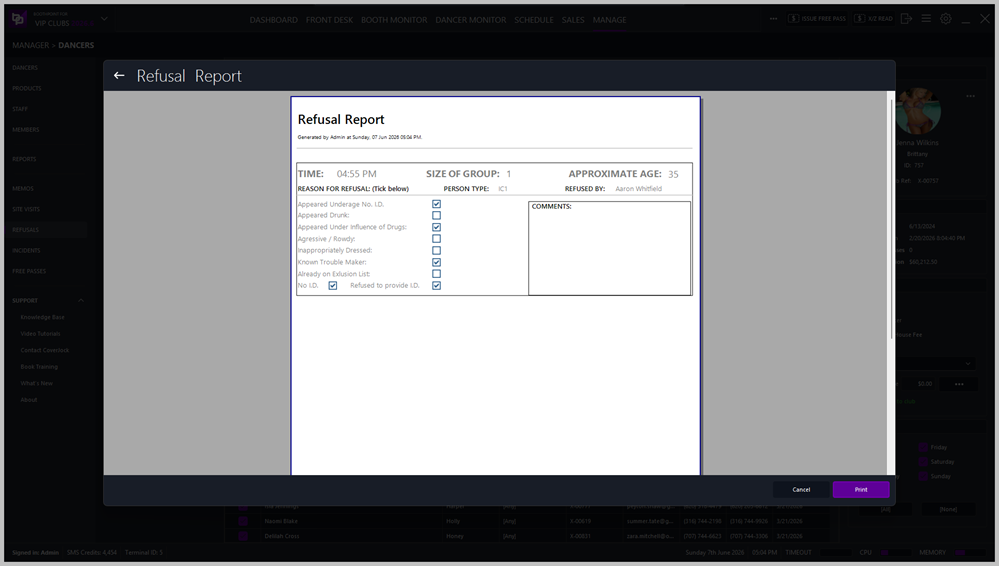
🧾 Refusal Report
Printed reports include:
|

|
Tip
-
Always record refusals immediately to maintain accurate logs.
-
Be factual and concise in comments — avoid personal opinions.
-
Use the printed report for management review or compliance documentation.
-
Regularly review refusal patterns to identify potential training or policy improvements.
|
|