|
The X‑Read and Z‑Read functions are essential parts of BoothPoint’s end‑of‑day reconciliation process. They ensure that all terminals, staff, and dancer transactions are accurately recorded and balanced before closing the session.
Understanding X‑Read vs. Z‑Read
| Type |
Purpose |
Access |
Action |
| X‑Read |
A read‑only snapshot of current totals. Used to check progress during the day. |
Available at any time from the terminal or Front Desk. |
Does not close the terminal or session. |
| Z‑Read |
A final reconciliation that closes the terminal or session. |
Run at the end of the day from each terminal, then from the Back Office. |
Closes the terminal or session and produces a printed receipt.
|
End‑of‑Day Sequence
To ensure accurate reconciliation, the following sequence must be followed:
|

|
Note
All terminals must complete the Z-Read routine to finalize closing the whole session down. A prompt will appear if not all terminals have been closed.
|
Step 1 – Close All Terminals
Each terminal must perform its own Z‑Read before the Back Office can close the session.
-
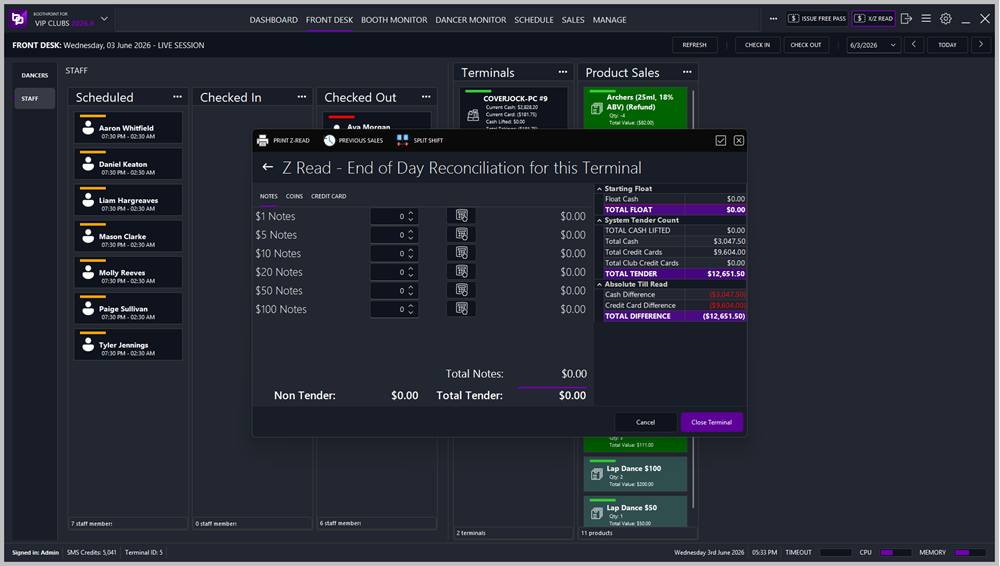
Access the Z‑Read – End of Day Reconciliation screen.
-
Enter the count of notes, coins, and credit cards.
-
Review the System Tender Count and Absolute Till Read sections for discrepancies.
-
Click Close Terminal to finalize the terminal’s totals.
-
A Terminal Z‑Read Receipt is printed automatically (see example below).
Terminal Z‑Read Receipt Includes:
-
Staff name and terminal ID
-
Float and total cash lifted
-
System tender count (cash, credit cards, funny money, tipping dollars)
-
Entered values and differences
-
Terminal sales analysis (house fees, dance sales, stage shows, service charges, etc.)
-
Bar sales analysis (non‑alcohol, liquor, beer, wine)
This receipt provides a full breakdown of the terminal’s performance and reconciliation status.
Step 2 – Close the Back Office Terminal
Once all terminals are closed, the Back Office acts as the final terminal.
-
Run the Z‑Read from the Back Office to close its own session.
-
This ensures all administrative transactions (e.g., adjustments, refunds, or manual entries) are included in the totals.
Step 3 – Run the Final Z‑Read (Session Closure)
After all terminals and the Back Office are closed, perform the final Z‑Read to close the entire session.
-
Access Front Desk → Z‑Read – End of Day Reconciliation.
-
Review totals for all terminals combined.
-
Confirm dancer commissions, tips, and house fees are correct.
-
Click Close Session to finalize the day’s operations.
Final Z‑Read Report Includes:
-
Start Float – Opening cash, funny money, and tipping dollars.
-
System Sales Count – Total cash, credit cards, and club credit cards.
-
Absolute Till Reads – Cash and card differences.
-
Funny Money / Club Credit Card / Tipping Dollar Usage – Sold, redeemed, and closing counts.
-
Bar Sales by Groups – Non‑alcohol, liquor, beer, and wine totals.
-
Dancer’s Information – Number of dancers, house fees, fines, and free passes.
-
Sales Analysis – Breakdown of all income and outgoings.
-
Totals – Club commission, dancer commission, surcharges, gratuity, and total takings.
This report provides the final figures for the day and is used for accounting and audit purposes.
Accessing Z‑Reads
Z‑Reads can be run from:
Best Practices
-
Always perform X‑Reads periodically throughout the day to monitor progress.
-
Ensure all terminals are closed before running the Back Office Z‑Read.
-
Verify totals and differences before printing receipts.
-
Keep printed Z‑Read receipts for audit and record‑keeping.
-
Run the final Z‑Read report to confirm total takings and commissions before starting the next day.
|