 |
BoothPoint Settings Below is all BoothPoint settings in categories. Select a category to read more. With over 600 options available to customize CoverJock and BoothPoint. |
|

|
Settings Screen Explained Helps you navigate the setting screen and know what is what. |
|
|
||||||||||||||||||
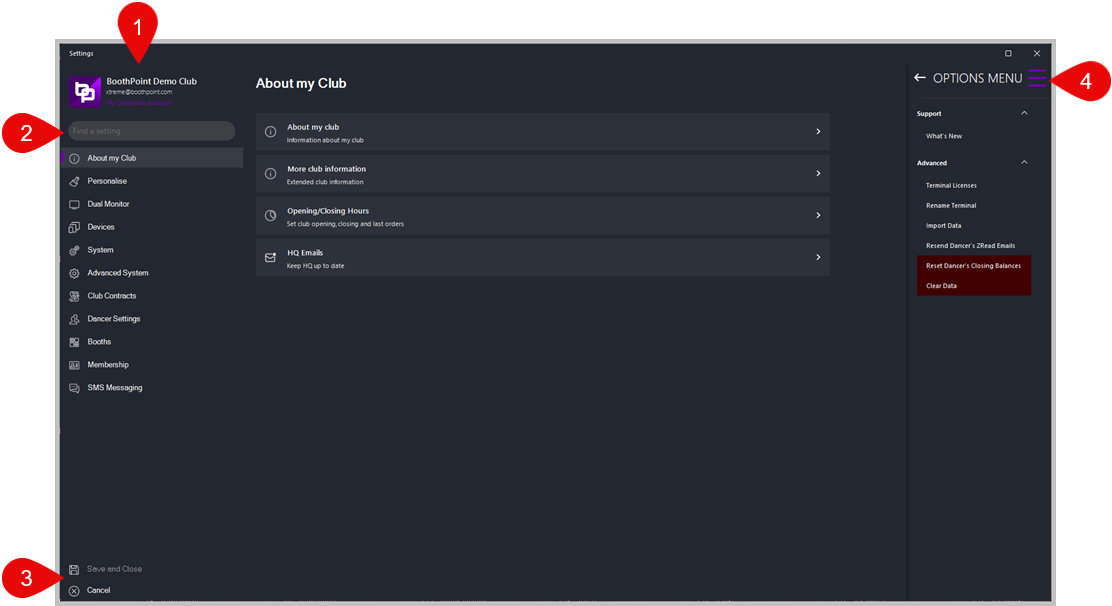
|
Function |
What it does |
Support |
|
|
What's New |
Shows a detailed list of what's new in current and previous versions. |
Advanced |
|
|
Terminal Licenses |
Password protected. In-house use only. |
|
Rename Terminal |
Allows you to change the description of the selected terminal. |
|
Import Data |
A built in function to import data such as staff, dancers and products. Note: this is password protected so mistakes can't happen.
|
| Reset Dancer’s Closing Balances |
This function will reset all dancers closing balances to zero. Note: this is password protected so mistakes can't happen. |
| Clear Data |
Once BoothPoint is install you may wish to clear all the data to start a fresh. Note: this is password protected so mistakes can't happen. |