🧭 Overview
The Site Visit system records official visits from external authorities such as Police, Fire Service, or Local Authority. It ensures that every visit is logged with arrival and departure times, officer details, and a summary of the visit’s purpose.
Each record is timestamped, stored under the staff member’s name, and can be printed for compliance or audit purposes.
📝 Creating a Site Visit Record
-
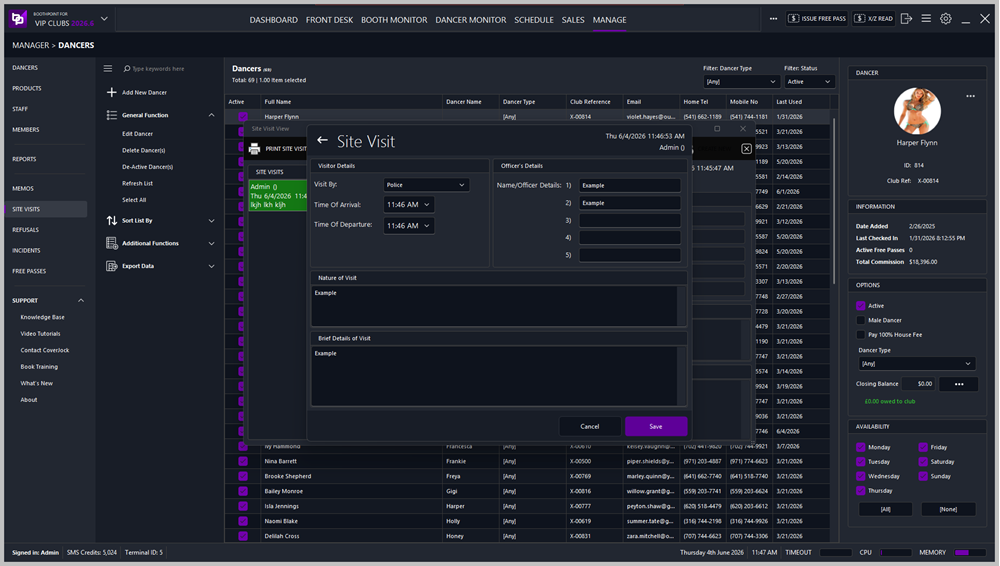
Open Site Visit View from the left‑hand menu or Manager > Dancers > Site Visits.
-
Click Create New to open a blank form.
-
Complete the following sections:
Visitor Details
| Field |
Description |
| Visit By |
Select the visiting organisation (Police, Fire, Local Authority, etc.). |
| Time of Arrival |
Record the time the visitors arrived. |
| Time of Departure |
Record the time they left. |
Officer’s Details
Enter the names of up to five visiting officers or representatives. Each field can include rank, badge number, or department if applicable.
Nature of Visit
Describe the purpose of the visit — for example, inspection, welfare check, licensing review, or safety audit.
Brief Details of Visit
Provide a concise summary of what occurred during the visit, including any actions taken or advice given.
💾 Saving and Actions
At the bottom of the form:
📂 Viewing and Printing Site Visits
At the top of the Site Visit View screen:
-
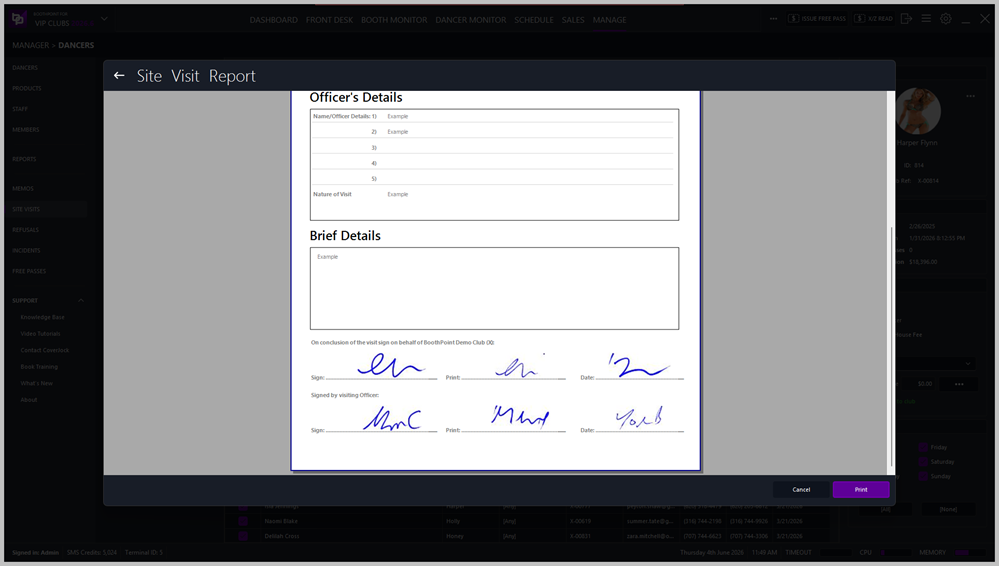
Print Site Visit – prints the selected record.
-
Print Blank Form – prints an empty template for manual completion.
-
Create New – opens a new site‑visit form.
🖋️ Signatures and Verification
At the conclusion of the visit:
-
The club representative must sign, print, and date on behalf of the venue.
-
The visiting officers must sign, print, and date on behalf of their organisation. These signatures confirm that the visit details are accurate and agreed upon by both parties.
|

|
Tip
-
Always record visits immediately after they occur.
-
Include all officer names for accountability.
-
Use clear, factual language — avoid assumptions or opinions.
-
Printed reports should be filed for compliance and inspection records.
|
|
|
Note
The system automatically date and time stamps who was logged on at the time the site visit was entered, it also stores who added the site visit report. These can be reported on, click here for more information.
|
|