Guest List Viewer
🧭 Overview
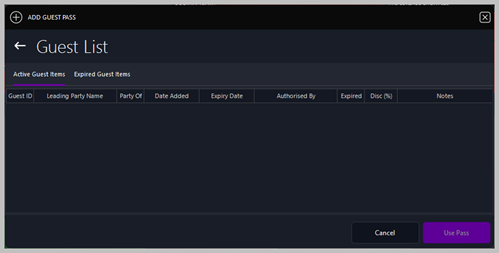
The Guest List Viewer is used to manage guest passes for the venue. It allows staff to add new guest passes, review active passes, check expired passes, and apply a pass to admit a guest.
This screen is typically used by reception, hosts, and managers to control guest access, apply discounts, and track authorized entries.
🗂️ Guest List TabsThe Viewer contains two tabs: Active Guest ItemsShows all currently valid guest passes that have not yet expired. Expired Guest ItemsShows guest passes that have passed their expiry date.
Switching between these tabs allows staff to quickly locate passes based on their status. 🧾 Guest Pass ListThe main table displays all guest passes within the selected tab. Columns
If the list is empty, no passes exist for the selected tab. ➕ Add Guest PassThe + ADD GUEST PASS button opens the Add Guest Pass form, allowing staff to create a new pass.
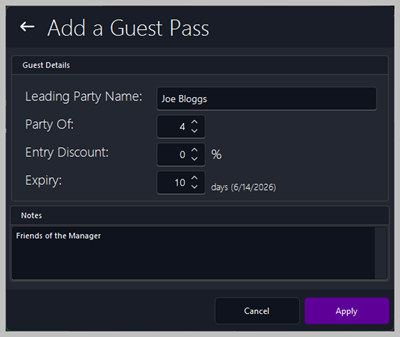
📝 Add Guest Pass FormGuest DetailsLeading Party NameName of the main guest or group leader. Party OfNumber of people included in the guest pass. Entry DiscountPercentage discount applied to the group’s entry fee. ExpiryHow long the pass remains valid. The system automatically displays the calculated expiry date. NotesOptional free‑text field for additional instructions or comments. Form ActionsApplyCreates the guest pass and adds it to the Active Guest Items list. CancelCloses the form without saving. 🛠️ Actions AvailableUse PassApplies the selected guest pass to admit the guest(s). This is typically used at the door or reception. CancelCloses the Guest List Viewer. 📊 Typical Use Cases
|
||||||||||||||||||||||