🧭 Overview
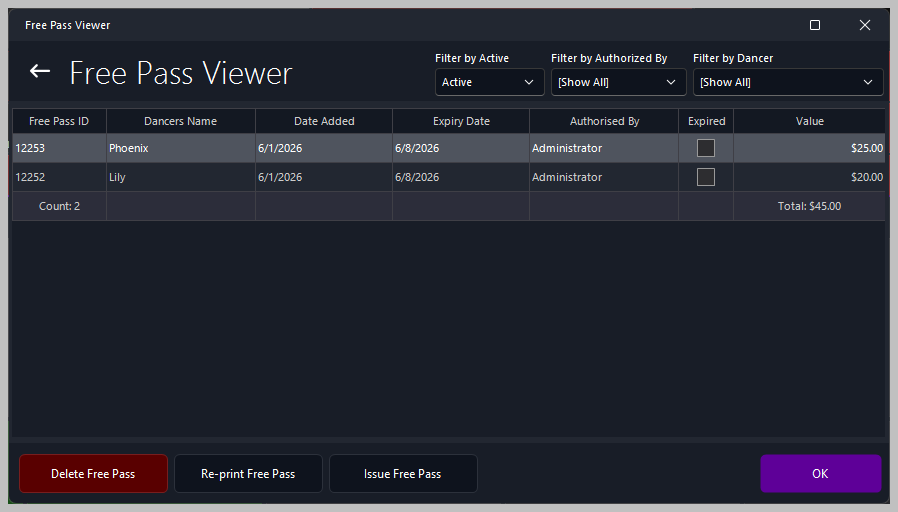
The Free Pass Viewer displays all complimentary passes issued to dancers or customers. It provides a complete audit trail including the issuing staff member, terminal, value, expiry date, and any associated notes.
Free Passes are generated automatically when created in the system and can be printed or emailed directly from the Viewer.
🧾 Receipt Details
The Free Pass Receipt contains all relevant information required for verification, auditing, and customer presentation.
Typical details include:
📑 Receipt Fields
| Field |
Description |
| Club Header |
Displays the club name and contact details. Controlled via Options > About My Club > About My Club > Club Name. |
| Free Pass Title & Number |
Shows the pass type and unique ID (e.g., FREE PASS [12253]). |
| Expiry Date |
Indicates when the pass becomes invalid. |
| Value |
The monetary or credit value assigned to the pass. |
| Issued By |
Staff member who created the pass. |
| Terminal |
The terminal or workstation used to issue the pass. |
| Notes |
Any additional comments added during creation. |
🔍 Filtering Options
The Viewer allows you to refine results using:

-
Date Range — View passes issued today, this week, or custom dates
-
Staff Member — Identify passes issued by specific employees
-
Terminal — Useful for multi‑terminal environments
-
Pass Value — Audit high‑value or unusual passes
-
Recipient — Track passes issued to specific dancers or customers
🛠️ Actions Available
Within the Free Pass Viewer, authorized staff can:
-
Reprint a Free Pass Receipt
-
Email the receipt directly to a customer
-
Export results for auditing
-
Drill into individual pass details
-
Verify staff activity and compliance
📊 Typical Use Cases
-
End‑of‑night reconciliation
-
Investigating customer or dancer disputes
-
Auditing complimentary pass activity
-
Monitoring staff behavior
-
Reviewing promotional or goodwill pass usage
|
