🧭 Overview
The Free Pass Receipt confirms the issue of a complimentary pass to a dancer or customer. It is generated automatically when a free pass is created and can be printed or emailed directly from the system.
This receipt provides full details of the pass, including the authorized staff member, terminal, value, and expiry date.
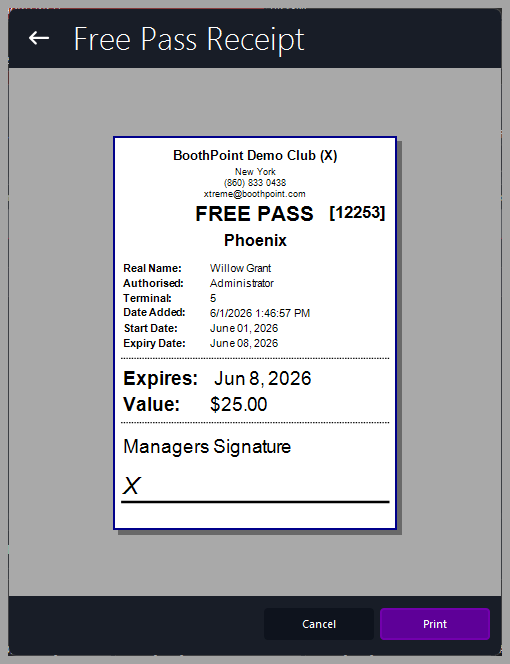
📋 Receipt Fields
|
Field
|
Description
|
|
Club Header
|
Displays the club name and contact details. Controlled by Options > About My Club > About My Club > Club Name
|
|
Free Pass Title and Number
|
Shows the pass type and unique ID (e.g., FREE PASS [12253]).
|
|
Dancer Name
|
The dancer or recipient of the pass.
|
|
Authorized By
|
Staff member who issued the pass.
|
|
Terminal
|
Identifies the terminal used for the transaction.
|
|
Date Added
|
Timestamp when the pass was created.
|
|
Start Date / Expiry Date
|
Validity period of the pass.
|
|
Value
|
Monetary value assigned to the pass.
|
|
Manager’s Signature
|
Printed signature line for authorization.
|
🖨️ Printing and Actions
At the bottom of the screen:
|

|
Tips
-
Ensure all pass details are correct before printing.
-
Use the Expiry Date and Value fields to track issued passes accurately.
-
Keep printed copies for audit or reconciliation purposes.
-
The receipt layout automatically adapts to the configured printer width.
|
|