🧭 Overview
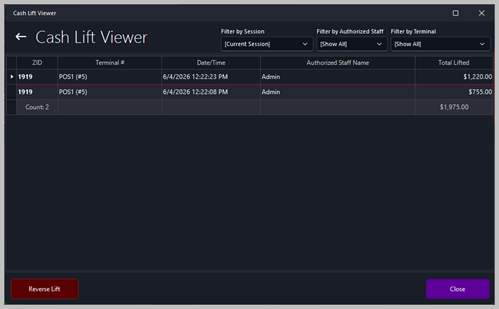
The Cash Lift Viewer displays all cash lift transactions recorded during the selected session or date range.
A cash lift is performed when the till contains too much cash and staff need to remove money from the drawer and place it securely in the back‑office safe.
This Viewer allows management to see who lifted cash, how much was lifted, from which terminal, and at what time. These records are essential for accurate cash‑up, reconciliation, and audit trails.
|

|
Tips
How to perform a cash lift from back office or POS terminal: Cash Lift
|
🧾 Cash Lift Records
The main panel lists all cash lift entries for the selected session.
Each row represents a single lift performed by an authorized staff member.
Columns
| Column |
Description |
| ZID |
The session ID the lift belongs to. |
| Terminal # |
The terminal where the cash was lifted. |
| Date/Time |
The exact timestamp of the lift. |
| Authorized Staff Name |
The staff member who performed the lift. |
| Total Lifted |
The amount of cash removed from the till. |
This table provides a clear audit trail of all cash movements out of tills.
🔍 Filtering Options

Filter by Session
Allows the user to view cash lifts from the current session or select a previous session.
Filter by Authorized Staff
Filters the list to show lifts performed by a specific staff member or all staff.
Filter by Terminal
Filters the list by terminal number, useful for multi‑terminal environments.
📈 Totals Summary
A summary line at the bottom of the Viewer displays:
These totals are used during:
-
End‑of‑night cash‑up
-
Safe balancing
-
Manager sign‑off
-
Financial auditing
🛠️ Actions Available
Reverse Lift
Allows authorized staff to reverse a cash lift if it was entered incorrectly. This action should be used carefully, as it affects cash‑up totals.
Close
Closes the Viewer and returns to the previous screen.
📊 Typical Use Cases
-
Monitoring cash levels across terminals
-
Identifying who removed cash and when
-
Supporting end‑of‑shift reconciliation
-
Investigating discrepancies in till balances
-
Providing audit evidence for financial reviews
|