Previous Sales Viewer

🧭 Overview

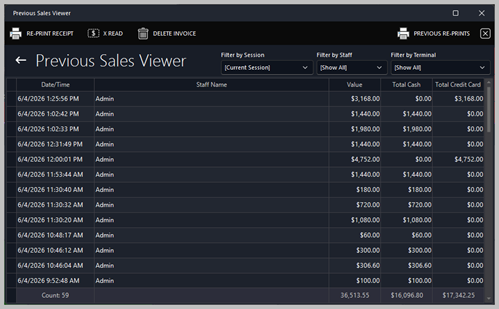
The Previous Sales Viewer provides a complete breakdown of all sales transactions recorded during the selected session or date range. It is primarily used by management, auditors, and supervisors to review staff performance, verify totals, and analyze payment methods.


This Viewer helps ensure accuracy in end‑of‑shift reconciliation, supports financial reporting, and assists in identifying unusual or incorrect transactions.


🧾 Sales List

The main panel displays a detailed list of all previous sales. Each row represents a single transaction processed by a staff member.

Columns

Column Description
Date/Time The exact timestamp when the sale was completed.
Staff Name The staff member who processed the transaction.
Value The total value of the sale, including all items and charges.
Total Cash The portion of the sale paid in cash.
Total Credit Card The portion of the sale paid by credit card.


This table allows staff to quickly identify high‑value transactions, payment splits, and staff activity patterns.

🔍 Filtering & Navigation

The Viewer typically allows filtering by:


  • Date/Time

  • Staff Member

  • Payment Type (Cash, Credit Card, or mixed)

  • Value Range


This makes it easy to locate specific transactions or analyze trends.

📈 Totals Summary

At the bottom of the Viewer, a summary line displays:


  • Total Number of Transactions

  • Total Value

  • Total Cash

  • Total Credit Card


These totals are essential for:


  • End‑of‑shift balancing

  • Cash‑drawer reconciliation

  • Manager sign‑off

  • Financial reporting

🛠️ Actions Available

Depending on permissions, staff may be able to:


  • Open a transaction to view full details

  • Reprint a receipt - see more

  • Export the sales list for reporting

  • Audit staff performance or discrepancies


Tips

View the further information about receipts here: Receipt Prints


📊 Typical Use Cases

  • Reviewing sales activity for a specific staff member

  • Investigating customer or payment disputes

  • Confirming totals during end‑of‑night cash‑up

  • Identifying unusual or incorrect transactions

  • Supporting financial audits and compliance checks


Â