🧭 Overview
The High Roller Receipt records high‑value card transactions and customer authorizations. It is accessed automatically when a transaction exceeds the High Roller Alert Value set in system options.
This form ensures compliance and provides a signed record for audit and HQ submission.
⚙️ General High Roller Options
Located under:
Options > Advanced System > General Charges
| Setting |
Description |
| High Roller Alert Value |
Defines the transaction amount that triggers the High Roller Form. |
| Must Print Club Receipt |
Forces printing of the club’s copy for internal records. |
|
Must Print Customer Receipt
|
Forces printing of the customer’s signed copy. |
📋 Customizable Fields
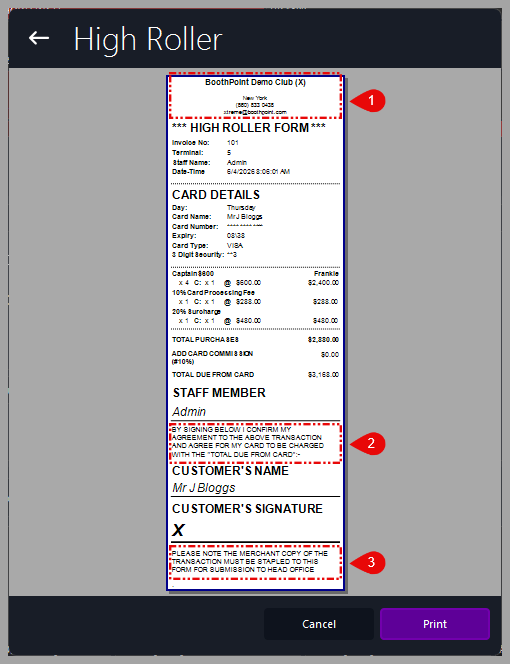
There are three editable areas on the High Roller Form:
-
🏷️ Header Information
-
Controlled by: Options > About My Club > About My Club > Club Name
-
Displays the club name and contact details at the top of the form.
-
Example: BoothPoint Demo Club (X) New York – (860) 833 0438 – xtreme@boothpoint.com
-
📝 Custom Agreement Text (Section 1)
-
Controlled by: Options > Devices > Other Devices > High Roller Custom Agreement Text
-
Appears above the customer’s name field.
-
Used for legal or consent wording such as: “By signing below I confirm my agreement to the above transaction and authorize my card to be charged.”
-
📄 Custom Agreement Text (Section 2)
-
Controlled by the same setting: Options > Devices > Other Device > High Roller Custom Agreement Text
-
Appears at the bottom of the form.
-
Commonly used for submission or compliance notes, e.g.: “Please attach the merchant copy for submission to Head Office.”
🖨️ Printing and Actions
At the bottom of the screen:
|

|
Tips
-
Ensure the High Roller Alert Value reflects your venue’s threshold for high‑value transactions.
-
Always print both Club and Customer copies when required for audit compliance.
-
Keep agreement text concise and legally approved by management.
-
Test print after editing to confirm layout and spacing.
|
|