🧭 Overview
The Staff Tip Viewer provides a complete breakdown of all tips paid to staff members during the selected session or date range. It allows managers, supervisors, and auditors to review how tips were paid (cash or card), verify totals, and ensure accurate end‑of‑shift reconciliation.
This Viewer is especially useful for tracking staff earnings, resolving disputes, and supporting payroll or compliance processes.
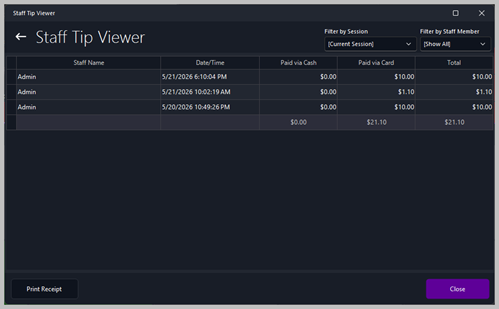
🧾 Tip Records List
The main panel displays a list of all recorded tips. Each row represents a single tip transaction assigned to a staff member.
Columns
| Column |
Description |
| Staff Name |
The staff member who received the tip. |
| Date/Time |
The exact timestamp when the tip was recorded. |
| Paid via Cash |
The amount of the tip paid in cash. |
| Paid via Card |
The amount of the tip paid by credit card. |
| Total |
The combined total of cash and card tips for that entry. |
This table helps staff and management quickly identify how tips were paid and track individual staff activity.
🔍 Filtering Options
The top‑right of the Viewer includes two filters:

Filter by Session
Filter by Staff Member
📈 Totals Summary
A summary line at the bottom of the Viewer displays:
-
Total Cash Tips
-
Total Card Tips
-
Total Tips Combined
These totals are essential for:
🛠️ Actions Available
Print Receipt
Prints a detailed receipt of the selected tip entry. This is useful for staff payout confirmation or audit trails.
Close
Closes the Viewer and returns to the previous screen.
📊 Typical Use Cases
-
Reviewing staff tip earnings for a shift
-
Confirming payouts during end‑of‑night cash‑up
-
Investigating discrepancies or customer disputes
-
Supporting payroll calculations
-
Monitoring staff performance and tip patterns
|
