|
The Dancer Account screen can be accessed from both the Back Office and POS terminals. It provides a detailed breakdown of all commissions earned by dancers from dances, drinks, stage shows, and other activities throughout the session.

🧾 Overview
When dancers earn commission, BoothPoint automatically stores these amounts in their account. At checkout, the system calculates and pays out the total commission due to the dancer.
Some venues operate under regulations that prohibit holding dancer cash, as dancers are self‑employed. In these cases, the Dancer Account screen allows staff to pay dancers out mid‑session from any terminal.
💰 Paying Out a Dancer Mid‑Session
📋 Steps
-
Open the Dancer Account screen.
-
Select the dancer from the list.
-
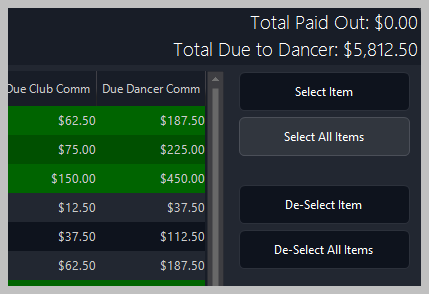
Review the Outstanding Payments table showing all items and commissions.
-
Tap or click Select Item or Select All Items to choose which payments to process.
-
Press Pay Cash Now to pay the dancer immediately.
|

|
Tip
Use Redeem Tipping Dollars to convert any tipping dollar balance into cash before payout.
|
🧾 Information Displayed
Each transaction shows:
-
Time — when the sale occurred
-
Description — product or service sold
-
Qty — quantity sold
-
Total Price — total sale value
-
Due Club Comm — commission owed to the club
-
Due Dancer Comm — commission owed to the dancer
At the top of the screen, BoothPoint displays:
|
|
Tip
The View Receipt button provides a printable summary of all transactions included in the payout.
|
| ⚙️ |
Best Practice
Perform mid‑session payouts only when required by club policy or local regulations. All payouts are logged automatically for accurate end‑of‑day reporting.
|
|