|
This section explains how to delete or deactivate dancers in BoothPoint, and how to restore them from the Recycle Bin.
🔎 Finding Dancers to Delete
🧭 Navigation
-
Open the Back Office
-
Go to Manage → Dancers
-
Use the search box on the left to find the dancer
-
Search includes: club reference, full name, stage name, email, mobile number
👥 Selecting Multiple Dancers
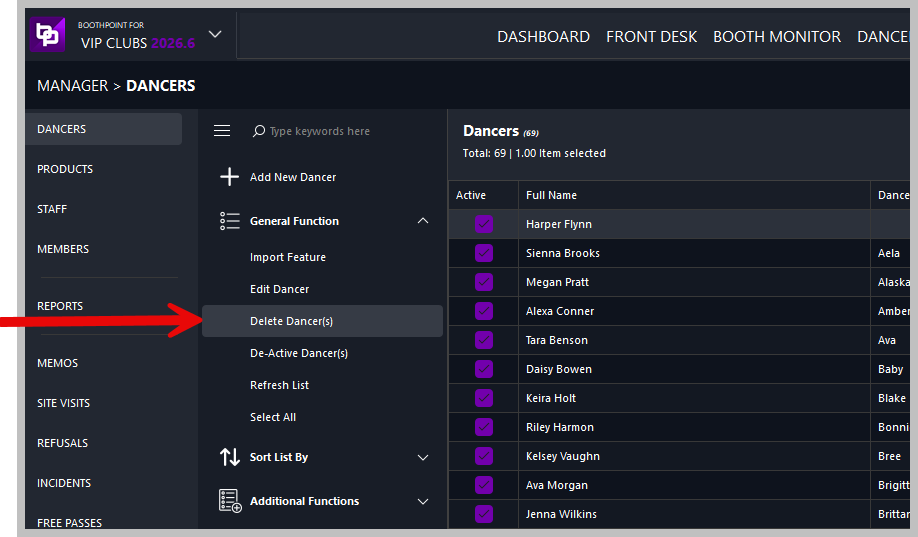
🗑️ Deleting Dancers
🧍♀️ Delete a Single Dancer
👥 Delete Multiple Dancers
| ⚠️ |
Confirmation Message
A message will appear:
Are you sure you want to delete the selected dancers (6)?
The number in brackets shows how many dancers are selected.
Select Yes to proceed or No to cancel.
|
|

|
Note
To deactivate dancers instead of deleting them:
This removes them from active lists without placing them in the Recycle Bin.
Dancers are not permanently deleted. They are moved to the Recycle Bin and can be restored at any time.
|
♻️ Restoring Dancers
If a dancer was deleted by mistake or has returned to the club, you can restore them easily.
🔄 Accessing the Recycle Bin
🧭 Navigation
-
At the top of the dancer list, tap or click the Recycle Bin tab
-
Use CTRL‑click to select one or more dancers to restore
🔁 Restoring Deleted Dancers
🔧 Restore Process
-
Select the dancer(s) in the Recycle Bin
-
On the left, under General Functions, tap or click Restore Dancer(s)
⚠️ Confirmation Message
A message will appear:
Are you sure you want to restore the selected dancers (6)?
Select Yes to restore or No to cancel.
|