🧭 Overview
The Dancer Check‑Out process finalizes a dancer’s session, calculates commissions, and records any outstanding balances or on‑account values.
It ensures accurate payout handling and generates a Z‑Read report for both printed and emailed records.
🏢 Back Office Access
You can check a dancer out from:
-
Front Desk
-
Quick Menu (top bar)
-
Extra Menu
🖥️ POS Access
You can check a dancer out from:
-
Check‑In Button (left‑hand side)
-
Extra Menu
📋 Stages to Check Out
-
Select Dancer – choose the dancer currently clocked in.
-
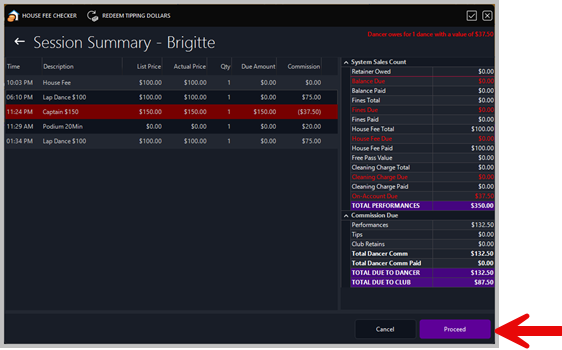
View Session Summary – review all performances, fees, and commissions.
-
Press Proceed – confirm session totals.
-
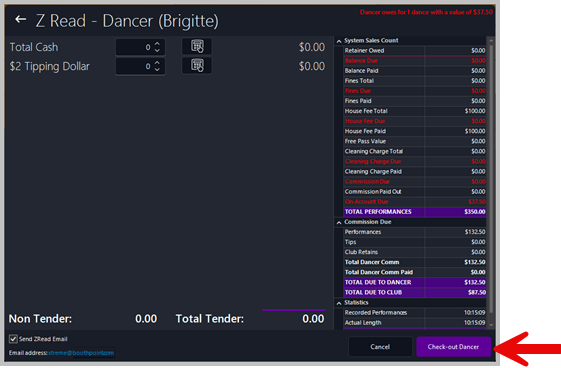
Declare Cash or Tipping Dollars – enter amounts received.
-
Click Check‑Out Session – finalize the dancer’s shift.
💬 System Prompts
During check‑out, the following confirmation messages appear:
-
“Pay out now or send to account?” Choose whether the dancer receives their commission immediately or it’s added to their account for the next shift.
-
“Pay out CASH from terminal?” Confirms if the payout is being made directly from the current terminal.
🧾 Reports and Receipts
-
A receipt is printed automatically upon completion.
-
A Z‑Read email is sent to the configured address (e.g., xtreme@boothpoint.com).
-
Full details are available under Key Reports > Z Read – Dancer
| ⚙️ |
System Logic
-
If a dancer checks out mid‑session and later returns, the system recognizes this and does not charge another house fee.
-
Outstanding balances (e.g., fines or on‑account dues) are carried forward automatically.
|
|

|
Tip
-
Always verify the Session Summary before proceeding.
-
Ensure all commissions and deductions are correct.
-
Use Pay Now for immediate payouts or To Account for deferred payments.
|
|