Front Desk Overview
|
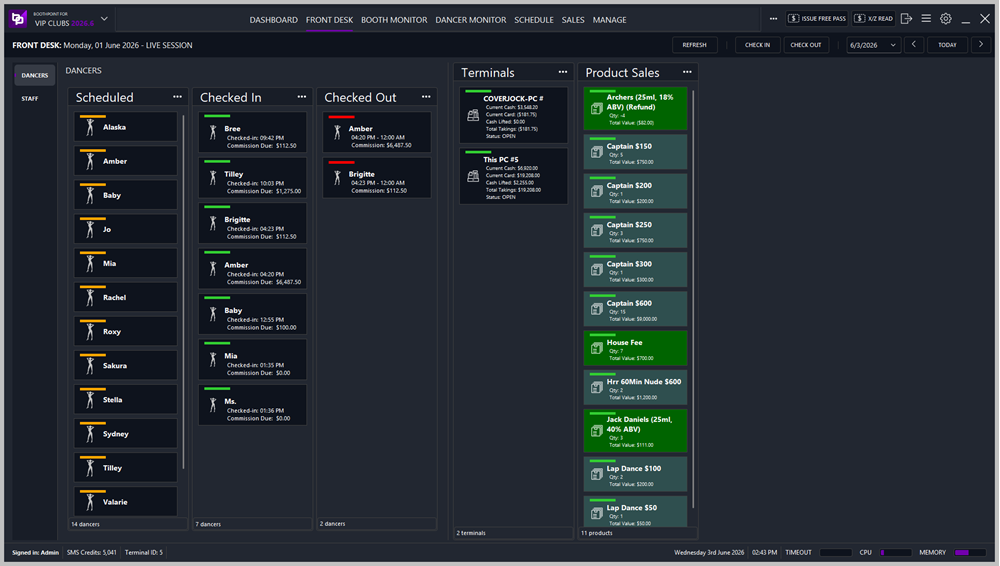
The Front Desk screen provides a live operational view of dancer activity, terminal performance, and product sales. It is designed for reception and management staff to monitor check‑ins, commissions, and transactions in real time.
|
|
|
Tip Selecting a dancer and clicking the 3 dot menu will show a list of functions:
|

Dancers Checked In
Shows dancers currently clocked in. Each entry includes:
-
Check‑in time
-
Commission Due (real‑time calculated based on sales and fees)
Example entries:
-
Bree — Checked‑in 09:42 PM, Commission Due $112.50
-
Tilley — Checked‑in 10:03 PM, Commission Due $1,275.00
-
Amber — Checked‑in 04:20 PM, Commission Due $6,487.50
|
|
Tip Selecting a dancer and clicking the 3 dot menu will show a list of functions:
|
Dancers Checked Out
Displays dancers who have completed their shift. Each entry includes:
-
Check‑out time
-
Total Commission Earned
Example entries:
-
Amber — Checked‑out 12:00 AM, Commission $6,487.50
-
Brigitte — Checked‑out 12:00 AM, Commission $112.50
|
|
Tip Selecting a dancer and clicking the 3 dot menu will show a list of functions:
|
2. Staff Panel
Sections
Staff Scheduled
Displays all staff members scheduled for the current session. Each entry includes:
-
Staff Name
-
Scheduled Start and End Time
Example entries:
-
Ella Turner — 07:30 PM to 02:30 AM
-
Ethan Cole — 07:30 PM to 02:30 AM
-
Harvey Dalton — 07:30 PM to 02:30 AM
At the bottom of the section, the total number of scheduled staff is displayed (e.g., 9 staff members).
|
|
Tip Selecting a staff member and clicking the 3 dot menu will show a list of functions:
|
Staff Checked In
Shows dancers currently clocked in. Each entry includes:
-
Check‑in time
-
Commission Due (real‑time calculated based on sales and fees)
Example entries:
-
Bree — Checked‑in 09:42 PM, Commission Due $112.50
-
Tilley — Checked‑in 10:03 PM, Commission Due $1,275.00
-
Amber — Checked‑in 04:20 PM, Commission Due $6,487.50
|
|
Tip Selecting a staff member and clicking the 3 dot menu will show a list of functions:
|
Staff Checked Out
Displays dancers who have completed their shift. Each entry includes:
-
Check‑out time
-
Total Commission Earned
Example entries:
-
Amber — Checked‑out 12:00 AM, Commission $6,487.50
-
Brigitte — Checked‑out 12:00 AM, Commission $112.50
|
|
Tip Selecting a staff member and clicking the 3 dot menu will show a list of functions:
|
2. Terminals Panel
Shows all active terminals connected to BoothPoint.
Each terminal displays:
-
Current Cash – Total cash transactions processed
-
Current Card – Total card transactions processed
-
Cash Float – Starting float amount
-
Total Takings – Combined total of cash and card
-
Status – Indicates whether the terminal is OPEN or CLOSED
Example:
-
POS1 #1
-
Current Cash: $348.20
-
Current Card: $1,178.71
-
Cash Float: $100.00
-
Total Takings: $1,278.71
-
Status: OPEN
-
|
|
Tip Selecting a dancer and clicking the 3 dot menu will show a list of functions:
|
3. Product Sales Panel
Displays all products sold during the live session, including drinks, fees, and dances.
Each product entry shows:
-
Product Name
-
Quantity Sold (Qty)
-
Total Value
Example entries:
-
Archers (25ml, 18% ABV) (Refund) — Qty 4, Total Value ($82.00)
-
Captain $150 — Qty 5, Total Value $750.00
-
Captain $600 — Qty 15, Total Value $9,000.00
-
House Fee — Qty 7, Total Value $700.00
-
Lap Dance $100 — Qty 2, Total Value $200.00
|
|
Tip Selecting a dancer and clicking the 3 dot menu will show a list of functions:
|
4. System Status Bar
Located at the bottom of the screen, showing:
-
Signed in: Admin
-
SMS Credits: 5,041
-
Terminal ID: 1
-
Date and Time: Now
-
Performance Indicators: Timeout, CPU, and Memory usage
Key Actions
-
Check In / Check Out – Manage dancer attendance.
-
Refresh – Updates all live data panels.
-
Date Selector – View historical or future sessions.
Best Practices
-
Always refresh before performing a Z‑Read to ensure all commissions are up to date.
-
Verify terminal status before closing the session.
-
Use Check‑Out to finalise dancer commissions and record totals.
-
Monitor Product Sales to track high‑performing items and refunds.