🧭 Overview
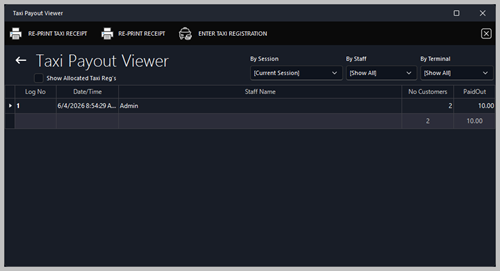
The Taxi Payout Receipt records payments made to taxi drivers who deliver customers to the venue. It is generated automatically when a payout is processed through the POS system.
This receipt shows a negative value, indicating money taken out of the till rather than received.
📋 Receipt Fields
| Field |
Description |
| Club Header |
Displays the club name and contact details. Controlled by Options > About My Club > About My Club > Club Name. |
| Receipt No / Till No |
Identifies the transaction and terminal used. |
| Staff Name / Date‑Time |
Shows who processed the payout and when. |
| Item Description |
Lists the payout type (e.g., Taxi Payout) and quantity. |
| Total |
Displays the total amount paid out (negative value). |
| Sales Tax Included |
Shows any applicable tax (usually $0.00 for payouts). |
| Payment Method |
Indicates whether the payout was made in cash or by card. |
| Change Section |
Used for balancing the till after payout. |
| Footer Message |
Customizable thank‑you or promotional text. Controlled by Options > Devices > Other Devices > Receipts. |
🖨️ Printing and Actions
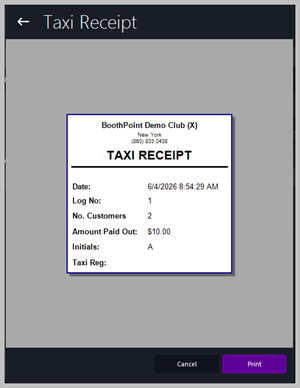
At the bottom of the screen:
⚙️ Configuration Path
To adjust club header details or footer text:
Options > Devices > Other Devices > Receipts
To modify club name or contact information:
Options > About My Club > About My Club
|

|
Tips
-
Negative totals indicate money leaving the till — verify before confirming.
-
Use this receipt to track taxi driver payments for end‑of‑shift reconciliation.
-
Keep printed copies for audit and accounting records.
-
Ensure payout amounts match the agreed taxi commission or drop‑off fee.
|
|