🧭 Overview
The Dancer Z‑Read Receipt provides a complete summary of a dancer’s session, including performance times, commissions, fees, and totals. It is generated automatically when a dancer is checked out at the end of their shift.
This report ensures accurate reconciliation between dancer earnings and club‑retained amounts.
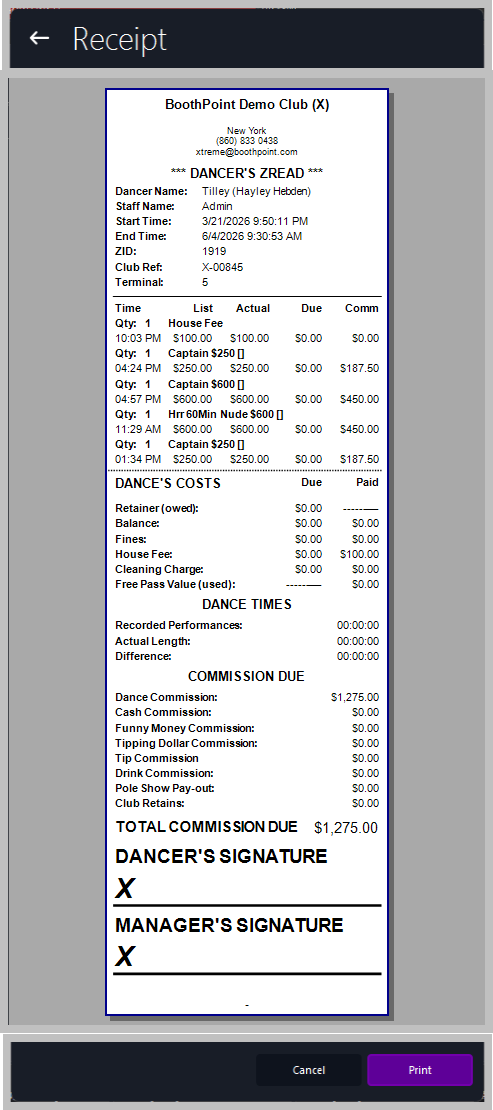
Z Read Emailed to Dancer
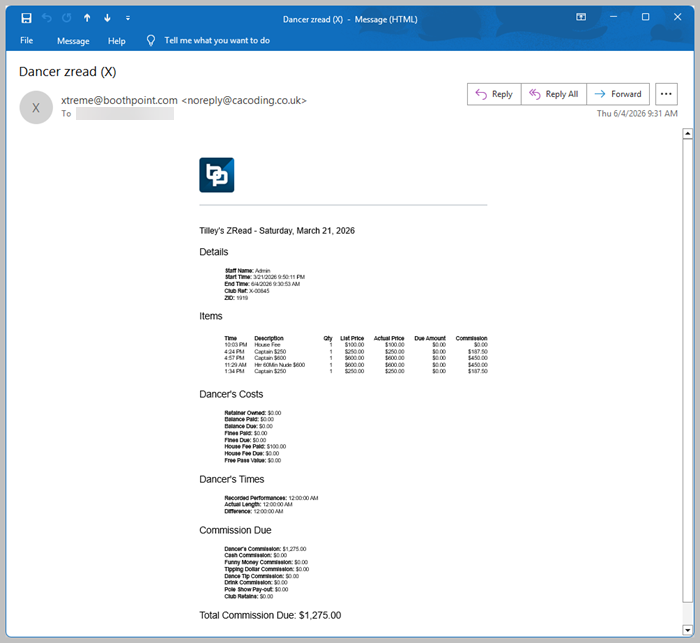
📋 Receipt Sections
🏷️ Header
Displays club name and contact details. Controlled by Options > About My Club > About My Club > Club Name.
👤 Dancer Details
-
Dancer Name – performer’s full name.
-
Staff Name – staff member who processed the checkout.
-
Start / End Time – session duration.
-
ZID / Club Ref / Terminal – identifiers for audit tracking.
🕒 Dance List
Itemized record of all performances and fees. Columns include:
-
Time – timestamp of each transaction.
-
Qty – number of performances or fees.
-
List / Actual / Due / Comm – listed price, actual charge, amount due, and commission earned.
💸 Dance’s Costs
Shows deductions and balances:
-
Retainer (owed) – any outstanding retainer.
-
Balance / Fines / House Fee / Cleaning Charge – deductions applied.
-
Free Pass Value (used) – value of any free passes applied.
⏱️ Dance Times
Tracks recorded performance durations:
-
Recorded Performances – total number of logged performances.
-
Actual Length – total time performed.
-
Difference – variance between recorded and actual time.
💰 Commission Due
Breakdown of all commission types:
-
Dance Commission – total earned from performances.
-
Cash / Funny Money / Tipping Dollar / Tip / Drink / Pole Show Pay‑out Commissions – additional earnings.
-
Club Retains – amount withheld by the club.
-
Total Commission Due – grand total payable to the dancer.
✍️ Signatures
🖨️ Printing and Actions
At the bottom of the screen:
|

|
Tips
-
Always verify commissions and deductions before printing.
-
Ensure both dancer and manager sign the receipt for audit compliance.
-
Keep printed copies for payroll and reconciliation records.
-
The Z‑Read automatically finalizes the dancer’s account for the session.
|
|