Re-Print Viewer

🧭 Overview

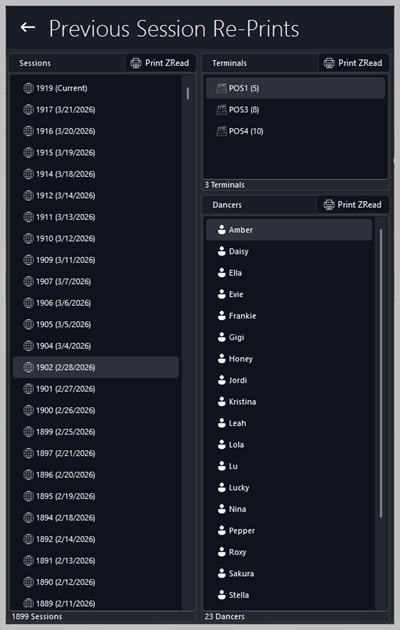
The Previous Session Re‑Prints window allows staff to reprint end‑of‑day reports for past sessions, including:


  1. Session End of Day (Z Read)

  2. Terminal Z Read

  3. Dancer Z Read


This screen is used by managers, supervisors, and auditors to retrieve historical reports for reconciliation, compliance checks, or dispute resolution.


Tips

View the further information about receipts here: Receipt Prints


📅 Sessions Panel

The left panel lists all previous sessions in chronological order.


Selecting a session loads the associated terminals and dancers who logged out during that session.

What you can do here

  • Scroll through all historical sessions

  • Select a session to view its terminals and dancers

  • Print the Session Z Read for the selected session


The Print ZRead button at the top prints the full end‑of‑day summary for the chosen session.


Tips

View the further information about the End of Day (Z Read) here: End of Day (Z Read)

🖥️ Terminals Panel

The middle panel displays all terminals that logged out during the selected session.


Each terminal shows the number of transactions processed during that session.

What you can do here

  • Select a terminal to highlight it

  • Print the Terminal Z Read for that specific terminal

  • Review terminal‑level activity for auditing or troubleshooting


The Print ZRead button above this panel prints the Z Read for the selected terminal only.


Tips

View the further information about the Terminal Z Read here: Terminal Z Read

💃 Dancers Panel

The right panel lists all dancers who logged out during the selected session.


This allows management to reprint individual dancer Z Reads for payout verification or dispute resolution.

What you can do here

  • Select a dancer from the list

  • Print the Dancer Z Read for the selected dancer

  • Review dancer‑level activity for the chosen session


The Print ZRead button above this panel prints the Z Read for the selected dancer.


Tips

View the further information about the Dancer Z Read here: Dancer Z Read

📊 Typical Use Cases

  • Reprinting a session’s full Z Read for accounting

  • Reprinting a terminal Z Read to investigate discrepancies

  • Reprinting a dancer Z Read for payout confirmation

  • Reviewing historical activity for audits or compliance

  • Resolving disputes involving past sessions


Â