🧭 Overview
The Z Read Report provides a complete end‑of‑day summary of all financial and operational activity across the venue. It consolidates totals from dancers, POS terminals, and back‑office transactions to ensure accurate reconciliation of takings, commissions, and fees.
This report is typically generated at closing time and forms part of the daily audit trail.
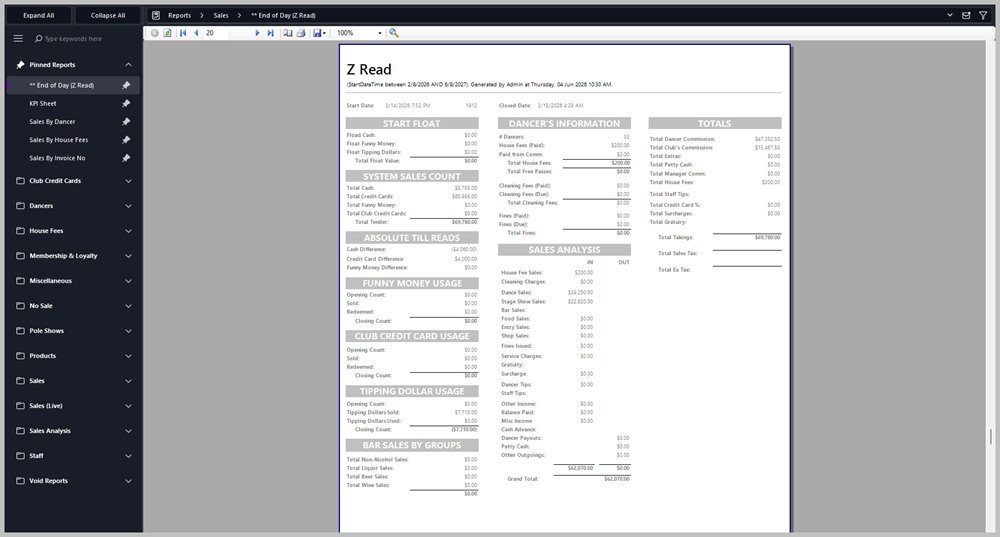
📋 Report Sections
🪙 Start Float
Displays the opening float values for the day.
-
Float Cash – starting cash in the till.
-
Float Funny Money – starting balance of club tokens.
-
Float Tipping Dollars – starting balance of tipping notes.
-
Total Float Value – combined total of all float types.
💰 System Sales Count
Summarises all payment types processed through the system.
-
Total Cash – total cash received.
-
Total Credit Cards – total card payments.
-
Total Funny Money – total redeemed club tokens.
-
Total Club Credit Cards – internal card transactions.
-
Total Read – grand total of all takings.
🧾 Absolute Till Reads
Shows discrepancies between expected and actual till counts.
-
Cash Difference – variance between recorded and counted cash.
-
Credit Card Difference – variance in card totals.
-
Funny Money Difference – variance in token reconciliation.
💵 Funny Money Usage
Tracks club token activity.
💳 Club Credit Card Usage
Monitors internal card transactions.
💸 Tipping Dollar Usage
Records tipping dollar activity.
🍸 Bar Sales by Groups
Breakdown of bar sales by category.
💃 Dancer’s Information
Summarises dancer‑related financials.
-
# Dancers – total number checked in.
-
House Fees (Paid) – total house fees collected.
-
Free Passes / Cleaning Fees / Fines – totals for each category.
-
Total House Fees – overall dancer fee income.
📈 Sales Analysis
Comprehensive breakdown of income and outgoings.
| |
IN |
OUT |
| House Fees |
$200.00 |
$0.00 |
| Cleaning Charges |
$0.00 |
$0.00 |
| Dance Sales |
$39,520.00 |
$0.00 |
| Stage Show Sales |
$22,620.00 |
$0.00 |
| Bar Sales |
$0.00 |
$0.00 |
| Food Sales |
$0.00 |
$0.00 |
| Entry Sales |
$0.00 |
$0.00 |
| Shop Sales |
$0.00 |
$0.00 |
| Fines Issued |
$0.00 |
$0.00 |
| Service Charges |
$0.00 |
$0.00 |
| Gratuity |
$0.00 |
$0.00 |
| Surcharge |
$0.00 |
$0.00 |
| Staff Tips |
$0.00 |
$0.00 |
| Other Income |
$0.00 |
$0.00 |
| Balance Paid |
$0.00 |
$0.00 |
| Misc / Cash Advance / Dancer Payouts / Petty Cash / Other Outgoings |
$0.00 |
$0.00 |
Total IN: $62,070.00 Total OUT: $0.00 Grand Total: $62,070.00
🧮 Totals
Final summary of commissions and takings.
-
Total Dancer Commission: $47,362.50
-
Total Club’s Commission: $15,467.50
-
Total Extras / Petty Cash / Manager Comm: $0.00
-
Total House Fees: $200.00
-
Total Staff Tips / Credit Card % / Surcharges / Gratuity: $0.00
-
Total Takings: $69,780.00
-
Total Sales Tax / Ex Tax: (blank fields for manual entry)
📤 Usage
-
Run this report at the end of each trading day.
-
Use it to reconcile tills, verify dancer commissions, and confirm total venue takings.
-
Export or print for management sign‑off and accounting records.
|

|
Tips
-
Ensure all terminals are closed before generating the Z Read.
-
Compare Cash Difference and Credit Card Difference to identify discrepancies.
-
Review Dancer’s Information for unpaid house fees or fines.
-
Keep archived copies for compliance and audit purposes.
|
|