Taxi Pay-out Print

đź§­ Overview

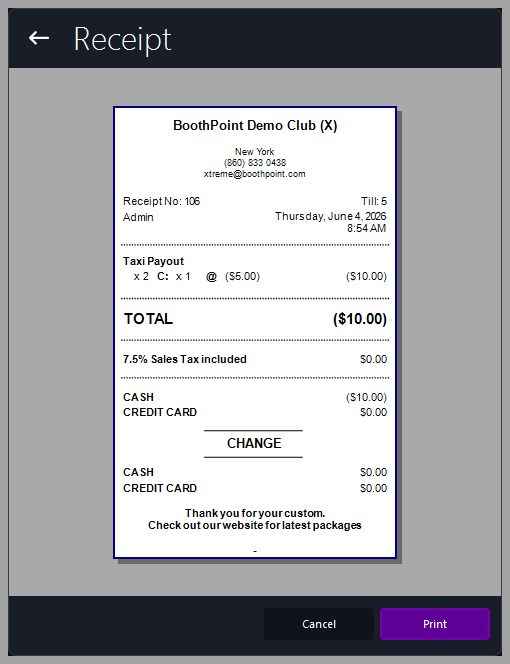
The Taxi Payout Receipt records payments made to taxi drivers who deliver customers to the venue. It is generated automatically when a payout is processed through the POS system.


This receipt shows a negative value, indicating money taken out of the till rather than received.


📋 Receipt Fields

Field

Description

Club Header

Displays the club name and contact details. Controlled by Options > About My Club > About My Club > Club Name.

Receipt No / Till No

Identifies the transaction and terminal used.

Staff Name / Date‑Time

Shows who processed the payout and when.

Item Description

Lists the payout type (e.g., Taxi Payout) and quantity.

Total

Displays the total amount paid out (negative value).

Sales Tax Included

Shows any applicable tax (usually $0.00 for payouts).

Payment Method

Indicates whether the payout was made in cash or by card.

Change Section

Used for balancing the till after payout.

Footer Message

Customizable thank‑you or promotional text. Controlled by Options > Devices > Other Devices > Receipts.

🖨️ Printing and Actions

At the bottom of the screen:

  • Cancel – closes the preview without printing.

  • Print – prints the Taxi Payout Receipt using the configured printer.


Tips

  • Negative totals indicate money leaving the till — verify before confirming.

  • Use this receipt to track taxi driver payments for end‑of‑shift reconciliation.

  • Keep printed copies for audit and accounting records.

  • Ensure payout amounts match the agreed taxi commission or drop‑off fee.


Â