🧭 Overview
The Tip Entry Receipt records customer payments that include optional tips. It is generated when a service charge or card payment requires manual tip entry before finalizing the transaction.
This receipt provides a clear breakdown of charges, taxes, and card fees, ensuring transparency for both staff and customers.
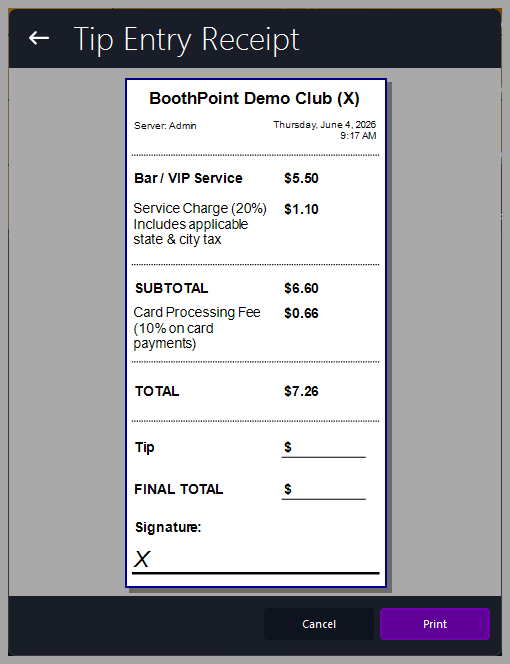
📋 Receipt Fields
|
Field
|
Description
|
|
Club Header
|
Displays the club name and contact details. Controlled by Options > About My Club > About My Club > Club Name.
|
|
Server / Date Time
|
Identifies the staff member processing the transaction and the exact date/time.
|
|
Bar / VIP Service
|
The main service or item purchased.
|
|
Service Charge (%)
|
Automatically calculated based on configured percentage. Includes applicable state and city tax.
|
|
Subtotal
|
Total before card processing fees.
|
|
Card Processing Fee (%)
|
Percentage fee applied to card payments (e.g., 10%).
|
|
Total
|
Combined subtotal and card processing fee.
|
|
Tip
|
Field for entering the customer’s voluntary tip amount.
|
|
Final Total
|
Grand total including tip.
|
|
Signature
|
Customer signature line for authorization.
|
🖨️ Printing and Actions
At the bottom of the screen:
|

|
Tips
-
Ensure service charge and card fee percentages are correctly configured in General Charges.
-
Always confirm the tip amount with the customer before printing.
-
Keep printed copies for audit or reconciliation purposes.
-
The receipt layout automatically adapts to the configured printer width.
|
|