🧭 Overview
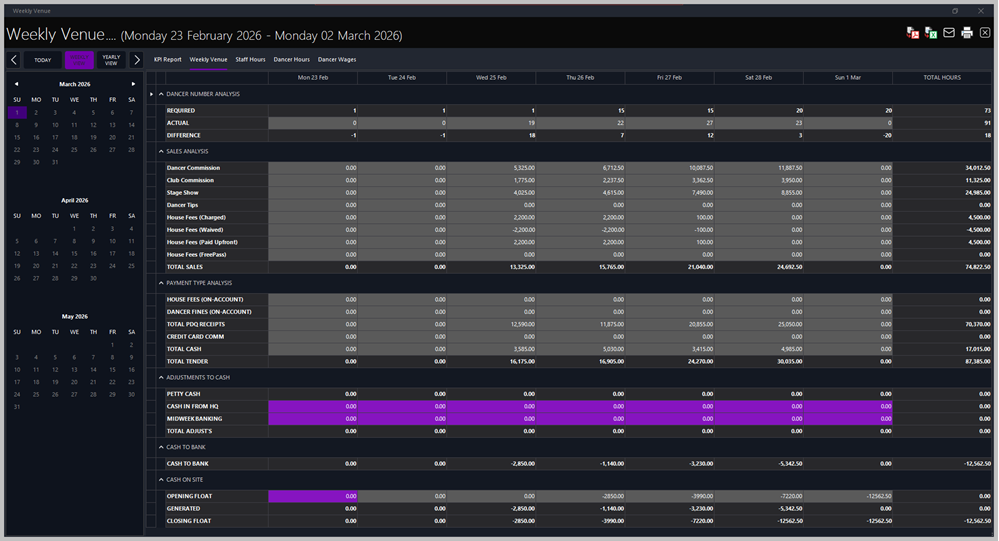
The Weekly Venue Report provides a detailed breakdown of venue performance for the selected week, including dancer numbers, sales, payment types, and cash flow. Access it from Reports > Sales Analysis > Weekly Venue.
Use this report to review daily totals, reconcile cash movements, and track overall venue profitability.
🗓️ Navigation
-
📅 Date Range (Top Header): Displays the selected week (e.g., Monday 23 February 2026 – Sunday 1 March 2026).
-
🗂️ Calendar (Left Panel): Select any week using the calendar. The active week is highlighted in purple.
-
🔘 View Buttons (Top Left):
-
Today – jumps to the current day.
-
Weekly View – shows the seven‑day venue summary.
-
Yearly View – displays annual totals for comparison.
Tabs along the top allow switching between related reports: KPI Report, Weekly Venue, Staff Hours, Dancer Hours, and Dancer Wages.
📊 Sections
💃 Dancer Number Analysis
Tracks dancer attendance and scheduling.
-
Required – number of dancers scheduled.
-
Actual – number of dancers who attended.
-
Difference – variance between scheduled and actual attendance.
💸 Sales Analysis
Summarises all income generated by the venue.
-
Dancer Commission / Club Commission – earnings split between dancers and club.
-
Stage Show / Dancer Tips – performance‑related income.
-
House Fees (Charged / Waived / Paid Upfront / FreePass) – breakdown of house‑fee types.
-
Total Sales – combined total for all sales categories.
💳 Payment Type Analysis
Shows how payments were received.
-
House Fees (On‑Account) – fees recorded but not yet paid.
-
Dancer Fines (On‑Account) – fines awaiting payment.
-
Total PDQ Receipts – card transactions.
-
Credit Card Comm – commission deducted from PDQ totals.
-
Total Cash / Total Tender – cash and combined payment totals.
💰 Adjustments to Cash
Displays manual adjustments and transfers.
-
Petty Cash – small cash expenses or reimbursements.
-
Cash In from HQ – funds sent from head office.
-
Midweek Banking – deposits made during the week.
-
Total Adjust’s – combined adjustment total.
🏦 Cash to Bank
Shows cash deposited to the bank.
💵 Cash on Site
Tracks float and on‑site cash levels.
-
Opening Float – starting cash balance.
-
Generated – cash generated during operations.
-
Closing Float – end‑of‑day cash remaining on site.
🧾 Top‑Right Action Buttons
-
📄 Export to PDF – generates a printable PDF version of the report.
-
📊 Export to Excel – exports all venue data to an Excel spreadsheet for further analysis.
-
✉️ Email Report – sends the report directly to the HQ email address configured in system settings.
-
🖨️ Print Report – prints the current Weekly Venue sheet using the default printer.
|

|
Tips
-
Run this report after closing each week to verify totals against POS and banking records.
-
Use Weekly View for operational reconciliation and Yearly View for trend tracking.
-
Ensure all dancer and sales data are entered before generating the report to avoid incomplete totals.
-
Export regularly for HQ submission or archival.
|
|