|
Buyer’s remorse and disputed transactions can be costly for gentlemen’s clubs. The High Roller feature provides an automatic protection process designed to safeguard the venue against disputed premium card transactions.
When a transaction exceeds a value set by the administrator, BoothPoint automatically launches the High Roller procedure. A quick swipe of the customer’s payment card generates a unique, detailed High Roller receipt containing:
The printed receipt requires both the customer and the BoothPoint operator to sign. A customer copy is also produced. The entire process takes only seconds and provides essential evidence for charge-back disputes.

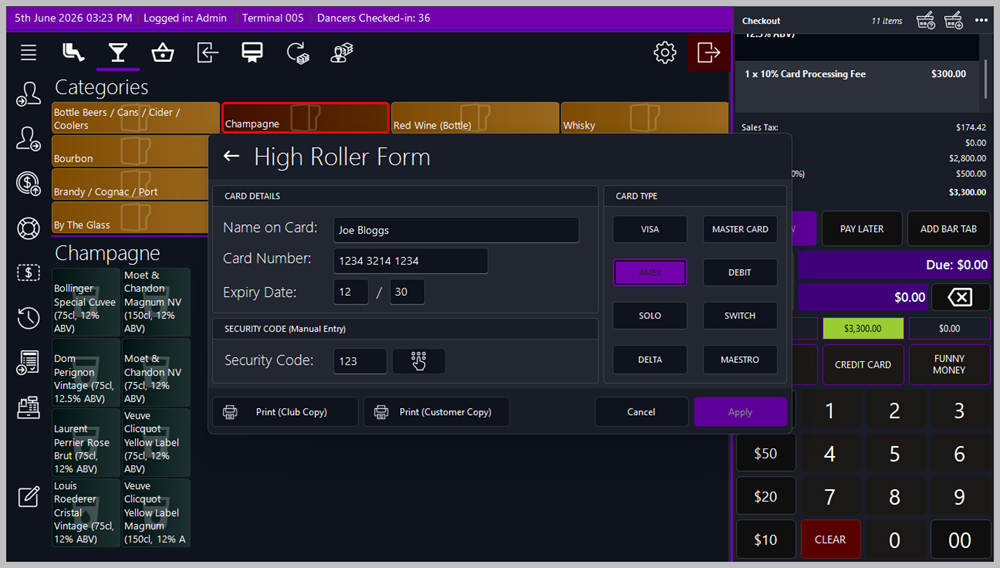
🧾 High Roller Process
📋 Steps
-
A message appears showing:
-
Process the payment on the PDQ machine.
-
If authorized, tap or click Yes to continue
-
If declined, tap or click No and request a different tender
-
A prompt appears asking you to swipe the customer’s credit card.
-
The High Roller form displays the customer’s name, card number, and expiry date.
-
Enter the last 3 digits of the card’s security code (rear of card).
-
Select the Card Type: Visa, MasterCard, Amex, Debit, Solo, Switch, Delta, or Maestro
-
Tap or click Print (Club Copy).
-
Tap or click Print (Customer Copy).
-
Tap or click Apply to complete the process.
-
If a Web Camera is configured, BoothPoint will prompt you to take a customer photo.
-
If a Scanner is configured, BoothPoint will prompt you to scan additional ID (e.g., driving licence or passport).
📸 Additional Devices
In Options → Local Devices:
-
If a Web Camera is enabled, BoothPoint automatically prompts for a customer photo
-
If a Scanner is enabled, BoothPoint prompts to scan additional ID
📧 HQ Notifications
BoothPoint can automatically email HQ when a High Roller transaction is completed. (See Options → Club Settings for configuration.)
|

|
Tip
In Options > Club Settings you can set the High Roller Value, any transaction where the credit card value is greater than this setting will be defined as a high roller. Additional settings so the user must print club receipt and/or the customer receipt. Credit Card charge [percentage can be found here.
In Options > Local Devices if a Web Camera BoothPoint automatically asks to take the customer's picture, also if a Scanner is selected a prompt appears asking to scan additional I.D. such as driving license or passport (scanner).
An email can be sent to headquarters immediately after the High Roller process is complete. See Options > Club Settings for more information.
|
|
|
Note
On cancel of the high roller form, the payment process is cancelled and the credit card value returns to zero.
|
|

|
Disclaimer
No credit card information is stored within BoothPoint what so ever, at no time does BoothPoint record any card information during or after the high roller process.
|
|